**This is an old revision of the document!**
7. Project Development
7.1 Introduction
This chapter details the technical and conceptual evolution of the Connect project, from its initial ideation to the final tested prototype. It outlines the design choices, system architecture, and iterative development required to transform a standard metro carriage into an interactive, collaborative canvas that challenges digital isolation.
It covers:
- Ideation & Concept: The transition from identifying the core problem of digital passivity to defining the metaphors and the two-phase interactive solution (real-time ambient light tracking and delayed asynchronous voice messaging).
- Design: The visual and experiential design principles, focusing on invisible technology, dynamic color-blending algorithms, and the minimalist user interface of the web platform.
- Structure: The physical framework of the project, encompassing structural drafts, material selection, detailed technical drawings, and 3D models with stress analysis.
- Smart System: The core technological architecture, detailing the hardware integration of touch sensors and RGB LEDs, alongside the software use cases, platform selection, and component diagrams.
- Packaging: The conceptualization, technical drawings, and structural analysis of the installation's packaging.
- Prototype: A comprehensive breakdown of the modifications made during the physical build, documenting necessary adaptations in structure, updated hardware schematics, and software code flowcharts.
- Tests & Results: The validation of the system through rigorous hardware functionality checks (Pass/Fail) and software testing, including performance metrics and System Usability Scale (SUS) evaluations.
- Summary: Concluding reflections on the development and testing phases, bridging the technical outcomes to the final project conclusions.
7.2 Ideation
7.2.1 Collecting Digital Habits and Identifying the Problem
Our ideation process began by collecting the main friction points of current digital habits and identifying a broader problem in today’s society: isolation, passivity, and a lack of real-world feedback. In today’s society, digital technology often leads to isolation rather than connection. Many people spend a large amount of time consuming content alone on their smartphones or computers, interacting more with screens than with each other. Social media and digital platforms often promote passive consumption, comparison, and distraction, which can negatively affect mental well-being and reduce opportunities for genuine self-expression. Instead of encouraging creativity and real-life interaction, technology frequently replaces physical social experiences with shallow virtual ones. As a result, people often feel more disconnected, less creative, and less involved in their communities.
7.2.2 Metaphore:
We then developed several metaphors for the connection.
- The City's Veins: The metro network acts as the circulatory system of Porto.
- Human Energy: The passengers' interactions provide the heartbeat and rhythm.
- Mirrored Networks: The LED light trails on the ceiling visually reflect the actual metro lines of the city.
- Flowing Connection: Distributing life, emotion, and stories throughout the underground.
From this process, our final direction emerged. We focused on the handrail as the main point of interaction because it is a universal and necessary point of contact in a moving train. We moved away from screen-based interaction and instead turned to ambient media. The idea was to create a “visual echo” of a person’s presence. We realized that by blending colors on the ceiling, we could visually represent the “melting” of social barriers.
7.3 Concept
Phase 1:
On the metro, you touch a handrail. The handrail is a tube that contains a sensor and a light. The spot where you touch the pole lights up in a color: your color. Your color then travels visibly through the pole up to the ceiling of the metro. On the ceiling of the metro there are LEDs. Your color appears on the ceiling through these LEDs. If another person touches a different pole, their color also appears on the ceiling, and your colors blend together.
Phase 2:
Near the exit doors, there is a QR code that creates a bridge from the visual interaction to a more personal level. After scanning it, a minimalist webpage opens with two main options: “Send” or “Read” If a passenger chooses the sending option, they are prompted with a reflective question such as “What is an experience you learned a lot from, and why?” encouraging them to write a short message with their story or a piece of personal advice. Alternatively, the “Read” option allows passengers to explore a message previously left by other travelers. An important detail is the accompanying note asking users to send or read the messages only after leaving the train. This intentional delay ensures that passengers remain present during the ride and enjoy the shared physical experience, rather than immediately retreating back into their smartphones. This extension continues the idea of connection between strangers and creates a deeper human exchange, while still keeping the focus on the shared space of the metro.
7.4 Design
In our design, we focus on making the technology invisible and the experience intuitive. During the ride, no smartphones or similar devices are required: simply holding the handles turns the metro journey into an adventure.
At the heart of the visual design is the interactive color mixing.
- Individual Identity: Each handrail (or each user) is assigned a specific color upon initial contact.
- Dynamic Convergence: As soon as multiple people touch different poles, the light streams on the ceiling migrate toward one another.
- Blending Algorithms: When two colors meet (e.g., blue and red), a new mixed color (violet) is created at the intersection. The more people participate, the more complex and vibrant the visual ecosystem on the ceiling becomes. This visually symbolizes how the presence of each individual alters the collective whole.
User Interface for the Message Page
The following Figur shows the 4 main screens of our web application. Screen one is the start screen, it includes the logo a two buttons to decide between “Send Message” and “Read Message”. In the second screen the people can type their messages and publish them. In screen three they can see their own published message, and the last screen shows the message of another person.

The web interface, accessible via QR code, is designed in a minimalist style. After scanning the QR code, users are redirected to the web application's landing page. The CONNECT logo takes center stage here, accompanied by two clickable buttons that lead to the subsequent sections. Within the app, users can choose between composing a message for others or viewing messages written by the community. Our primary focus was to keep the application as simple as possible; we wanted to ensure that both young and old users can navigate it effortlessly. By eliminating the need for logins or complex navigation, we’ve made the experience accessible and time-efficient for everyone.
7.4.1 Structure
Figures 2, 3, and 4 present the evolution of the structural design across successive iterations. Each version reflects an increase in geometric precision, component integration, and manufacturability, progressing from early conceptual layouts to a fully defined enclosure suitable for system integration.
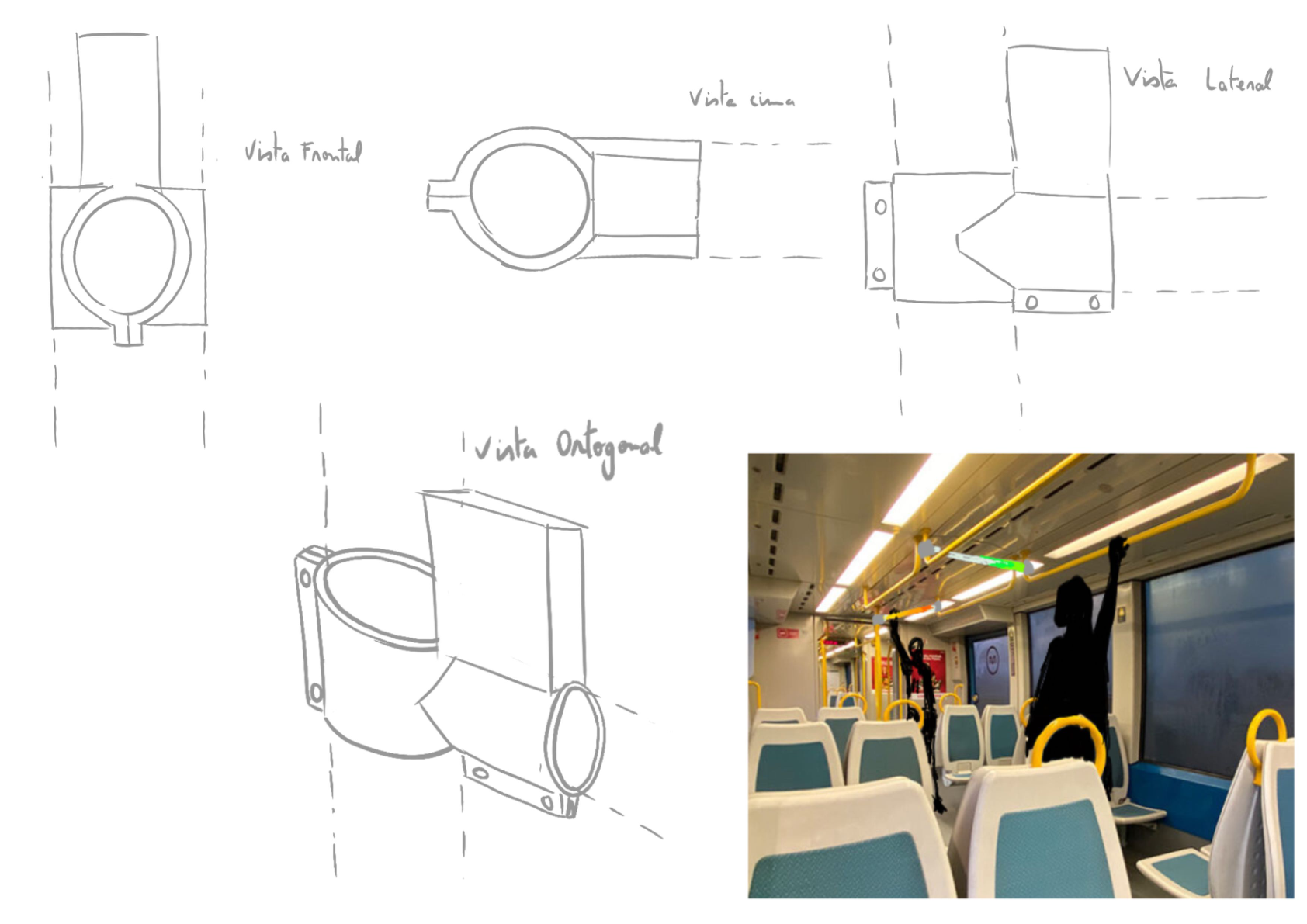
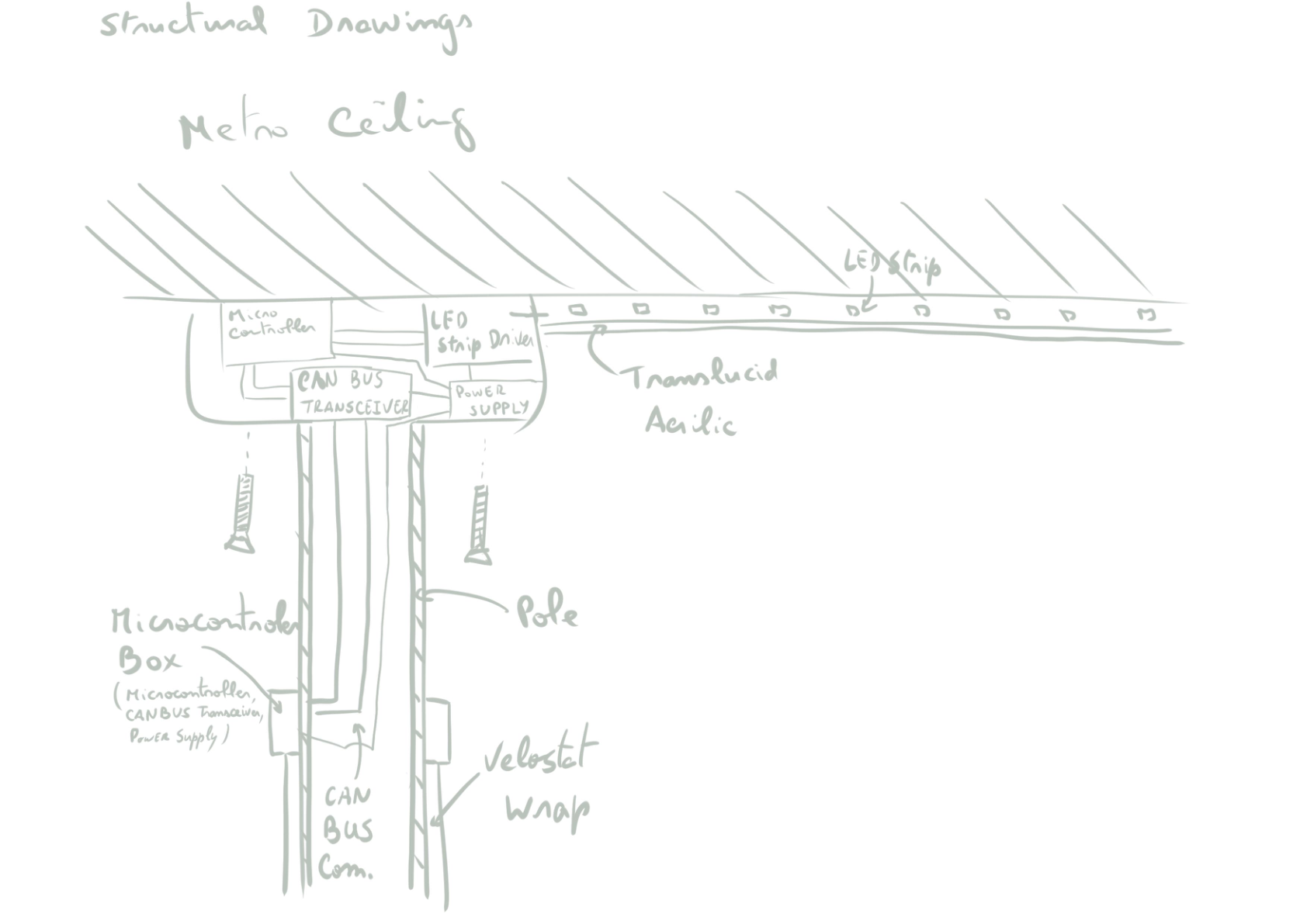
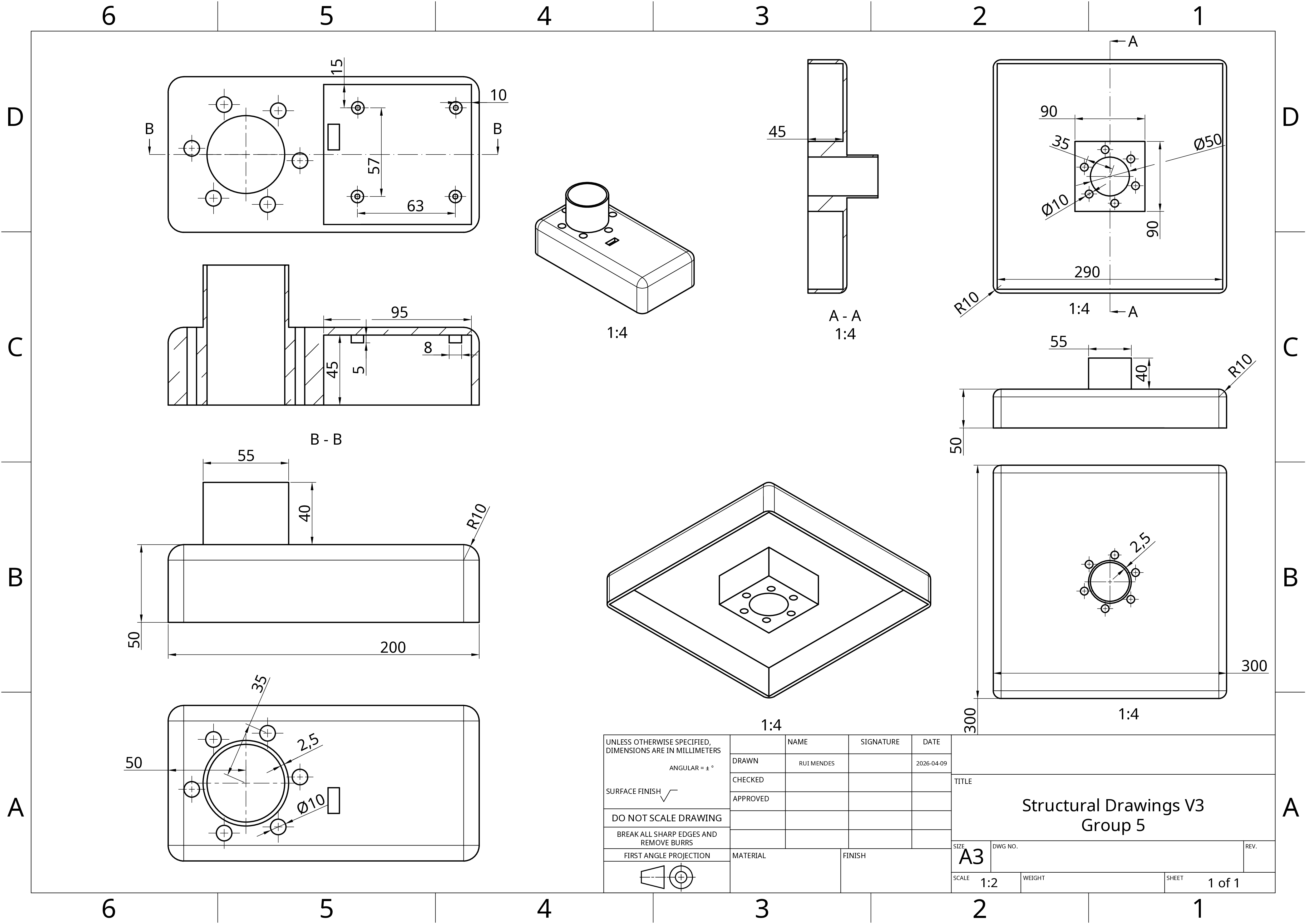
The transition from preliminary sketches to detailed structural drawings (see Figure 4) marked a key milestone in the project. At this stage, the spatial constraints of all subsystems were clearly defined, including the placement of electronic components, routing of wiring, and mounting strategy. This enabled the development of a specialized Bill of Materials (BoM), as presented in Table 1, where component selection was directly informed by mechanical, environmental, and regulatory requirements.
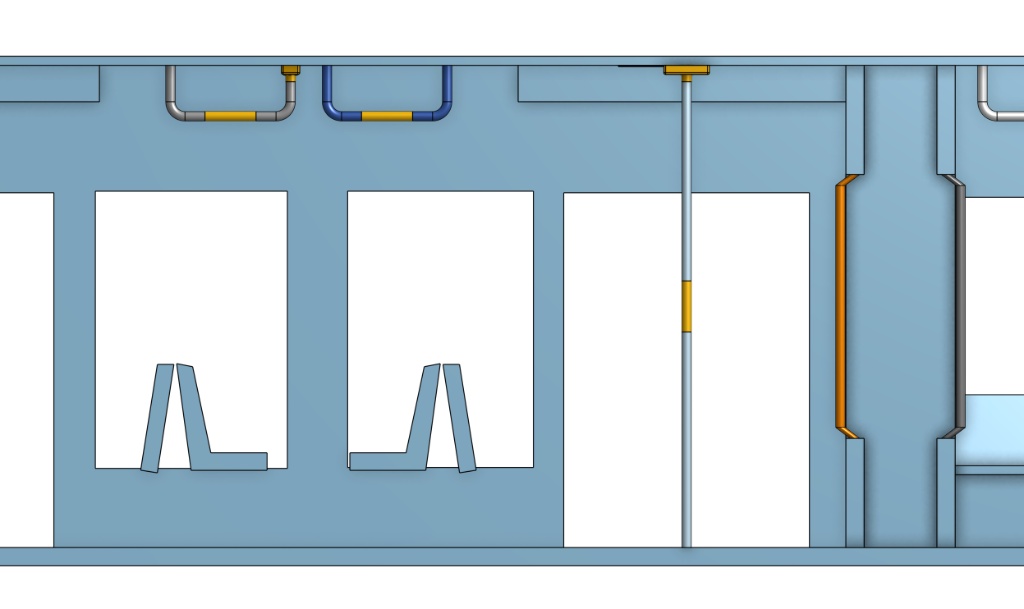
To complement the mechanical drawings, the contextual 3D model (see Figure 5) illustrates how the physical framework populates the public space. This visualization confirms that the physical hardware respects the clearance boundaries required for passengers in a moving train, validating the scaling from a standalone enclosure to a macro-level vehicle installation.
Three primary constraints shaped the structural design: enclosure material selection and regulatory compliance, integration of communication hardware within a constrained geometry, and accommodation of power distribution components.
Enclosure Material and Regulatory Complianc
The enclosure design aims to ensure compatibility with metro environments, where safety requirements are critical. In particular, EN 45545-2 imposes strict constraints on material flammability and smoke emission. Initial concepts considered PLA due to its accessibility for rapid prototyping. However, due to its poor fire resistance, it is not suitable for real deployment. For this reason, the design considers Polyamide (PA) Rail as a future implementation material, as it meets railway fire safety standards. At the current prototype stage, this requirement is addressed conceptually, with the enclosure geometry designed to be compatible with such materials, while fabrication remains focused on accessible prototyping methods.
Mechanical Integration and Mounting
The structural design defines the placement and fixation of internal components, including PCBs, sensors, and power elements. Mounting points are incorporated to allow secure attachment of the PCBs using standard fastening methods (e.g., screws and standoffs), ensuring mechanical stability under vibration and movement conditions typical of public transport environments. The enclosure also considers accessibility for assembly and maintenance, allowing access to connectors and internal components without requiring complete disassembly.
Wiring and Internal Layout Considerations
Although detailed cable routing is not fully defined at this stage, the structural design accounts for basic wiring requirements. Dedicated entry and exit points for cables are considered, along with internal space allocation for routing. Particular attention is given to the separation of power and signal lines, in order to reduce potential electrical interference and improve system reliability. These considerations will guide future iterations of the design, where detailed routing and harnessing will be implemented.
Thermal and Environmental Considerations
The system includes components such as DC-DC converters and LED drivers, which generate heat during operation. At this stage, thermal management is addressed through basic passive strategies, including spacing between components and the potential inclusion of ventilation openings in the enclosure. Environmental protection (e.g., against dust and humidity) is considered at a conceptual level, with the enclosure intended to evolve toward a more sealed and robust design in future iterations.
The BoM presented in Table 1 reflects the current stage of the design, combining prototyping components with elements selected based on future deployment requirements.
While some components (such as enclosure materials) are specified with industrial standards in mind, others are selected to support rapid prototyping and testing. This hybrid approach allows validation of system functionality while maintaining a clear path toward a more robust, deployment-ready solution.
| Name | Type | Supplier & more details | Additional notes | Price (€) | Quantity | Total (€) |
|---|---|---|---|---|---|---|
| Microcontroller | Wemos C3 mini | Link | 1 is main board, others are support ones | 6.20 | 11 | 68.20 |
| Box for electronics equipment | PA Rail | Link | Fire resistant, could not find a Portuguese supplier (this one is French) | 69.30 | 2 | 138.60 |
| Copper tape | Link | 8.86 | 15 | 132.90 | ||
| Pressure sensor | Velostat | Link | 7.90 | 15 | 118.50 | |
| CAN Transceiver | MCP2551-I-P | Link | At 26.03 not in stock, email store to check availability | 1.99 | 10 | 19.90 |
| LED strip with covers | Addressable RGB | Link | 30.49 | 3 | 91.47 | |
| Power supply (12 V) | DC-DC converter | Link | 2 m strips draw 7.2 A at full power (~30 % reserve) | 24.67 | 6 | 148.02 |
| Power supply (5 V) | DC-DC converter | Link | 37.15 | 1 | 37.15 | |
| Wiring, resistors etc. | Link | Really cheap | 10.00 | 1 | 10.00 | |
| Delivery cost | Stationary store | To be reviewed | 0 | 1 | 0 | |
| Total Project Cost | 764.74 |
Structural Stress and Robustness Analysis
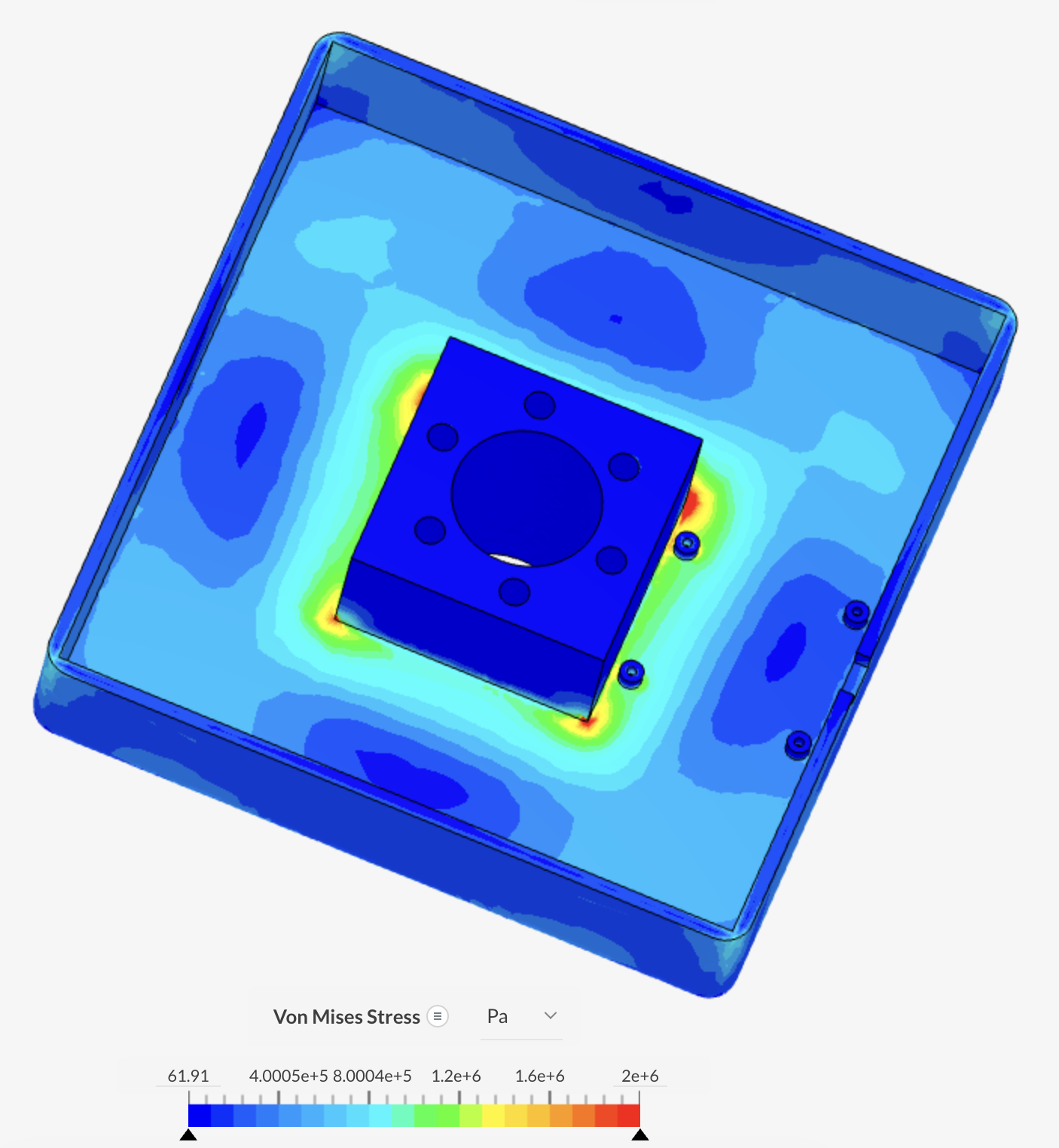
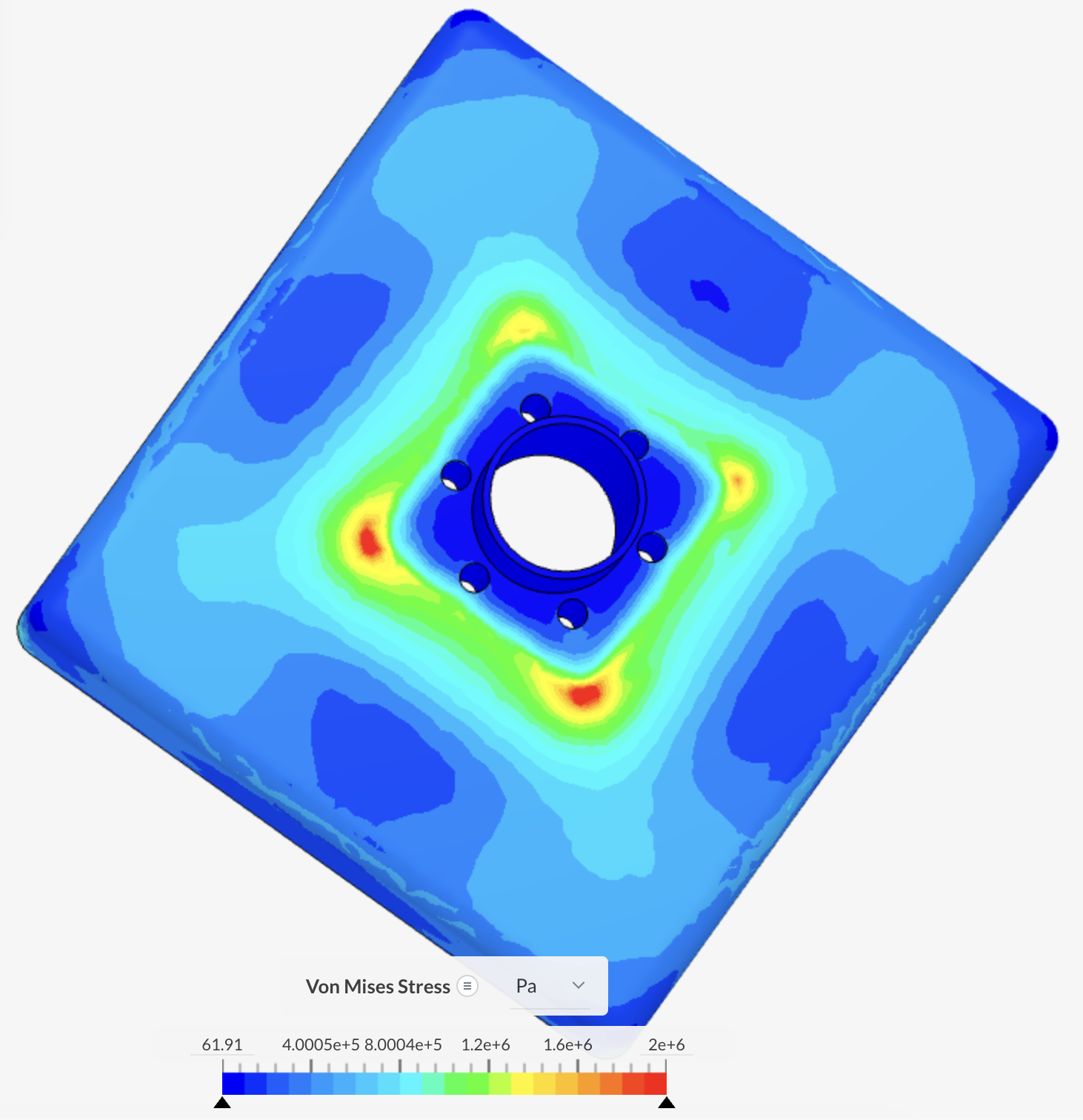
To guarantee the physical integrity of the distributed hardware infrastructure and validate compliance with strict public transit conditions, Finite Element Analysis (FEA) linear static simulations were conducted within SimScale. The analysis targeted the specific configurations of the ideal deployment, evaluating the mechanical behavior of both the ceiling-mounted Main Box and the vertical pole-mounted Secondary Node under operational stress and anti-vandalism scenarios (such as passenger impacts or sudden handrail load shifts). Both enclosures were modeled using the properties of the specialized Nanovia PA Rail (Polyamide) compound specified in Table 1.
For the ceiling-mounted Main Box, mechanical fixtures (Fixed Support) were applied directly to the internal cylindrical surfaces of the mounting bolt holes, replicating a rigid steel-fastened connection to the carriage ceiling framework. A distributed static structural load of 100 N was applied perpendicular to the lower face of the enclosure, simulating the mechanical force transmitted through the central support pole when handled by passengers.
As displayed in the optimized Von Mises stress plots for the Main Box (see Figure 6 and Figure 7), the visualization scale was tightly bounded to a maximum of 2.0 MPa ($2.0 \times 10^6\text{ Pa}$) to map the precise path of stress propagation across the enclosure's geometry. The structural tension smoothly gradients from the safe, low-stress outer walls (blue zones) and securely concentrates around the anchoring junctions and sharp internal mounting features (green to red zones). Even with the absolute peak localized stress reaching 3.99 MPa ($3.993 \times 10^6\text{ Pa}$) at the sharpest geometric interfaces, the entire infrastructure operates significantly below the yield strength threshold of industrial Polyamide (which typically spans between 50 MPa and 70 MPa), yielding an exceptional safety factor greater than 12.0.
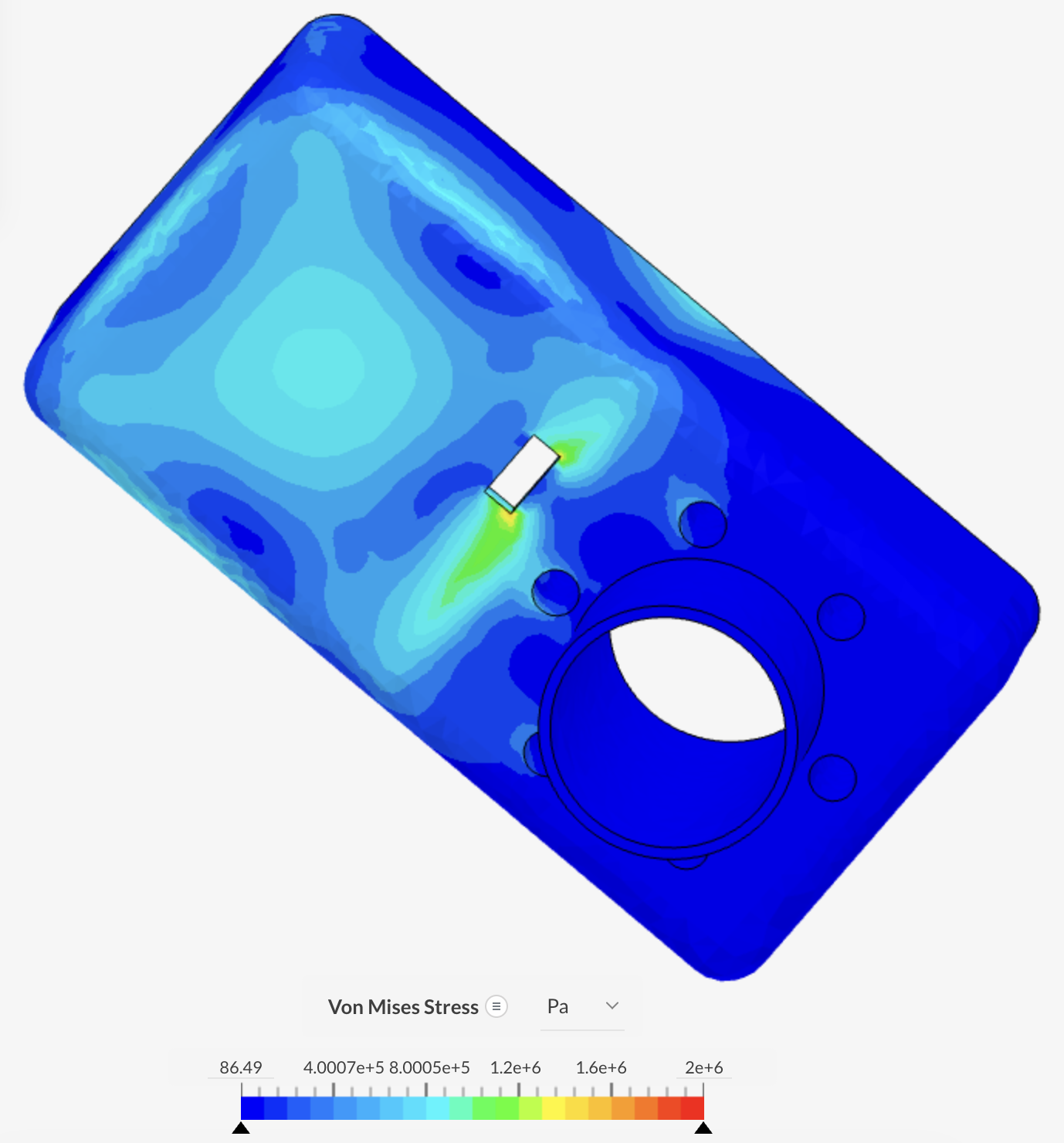
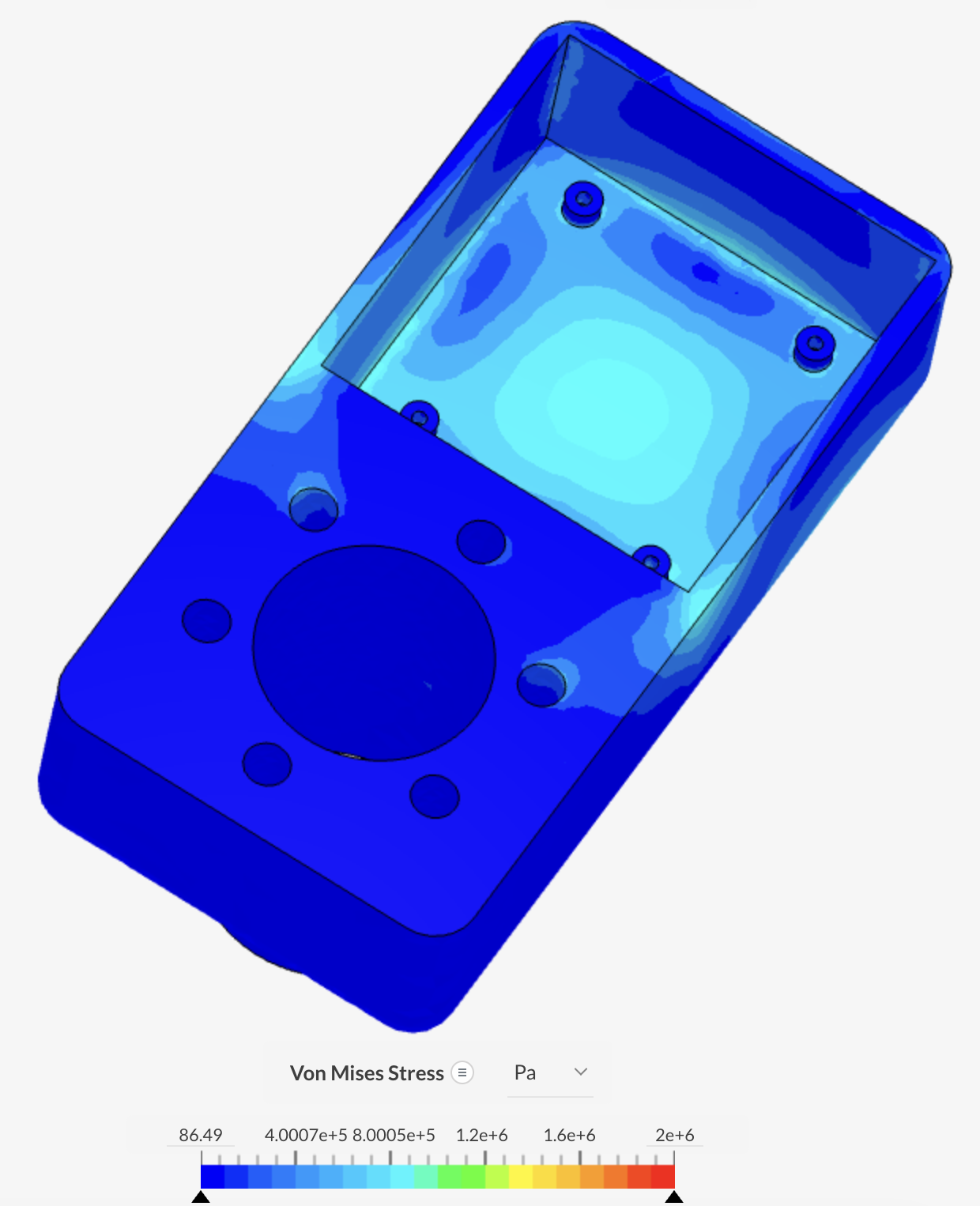
Simultaneously, the pole-mounted Secondary Node enclosure was subjected to an identical validation process to evaluate its resistance to direct side impacts and handling stress. Fixed support constraints were allocated to its interior hardware mounting bosses, while a 100 N impact-equivalent load was distributed across its interactive face shell.
As shown in Figure 8 and Figure 9, the stress distribution follows a highly stable path. Due to the smoothed filleted edges of the enclosure, stress accumulation is minimized, with minor localized concentrations rising around the rectangular cutouts and transitional fillets, reaching a maximum value of approximately 1.60 MPa ($1.6 \times 10^6\text{ Pa}$). This configuration leaves the internal electronic component mounts completely isolated from external physical strain. Operating with an implied safety factor exceeding 30.0 against the material's elastic limit, the secondary enclosure demonstrates outstanding structural resilience.
The combined mathematical results from these FEA studies definitively validate the housing architectures against intense public interaction, deliberate vandalism, and the continuous mechanical vibrations typical of the Porto Metro transport ecosystem, proving that no further geometric optimisations are required before prototyping phases.
7.4.2 Smart System
Hardware
Figure 10 presents the black box diagram, which includes all the major systems that will be used for our Smart System.
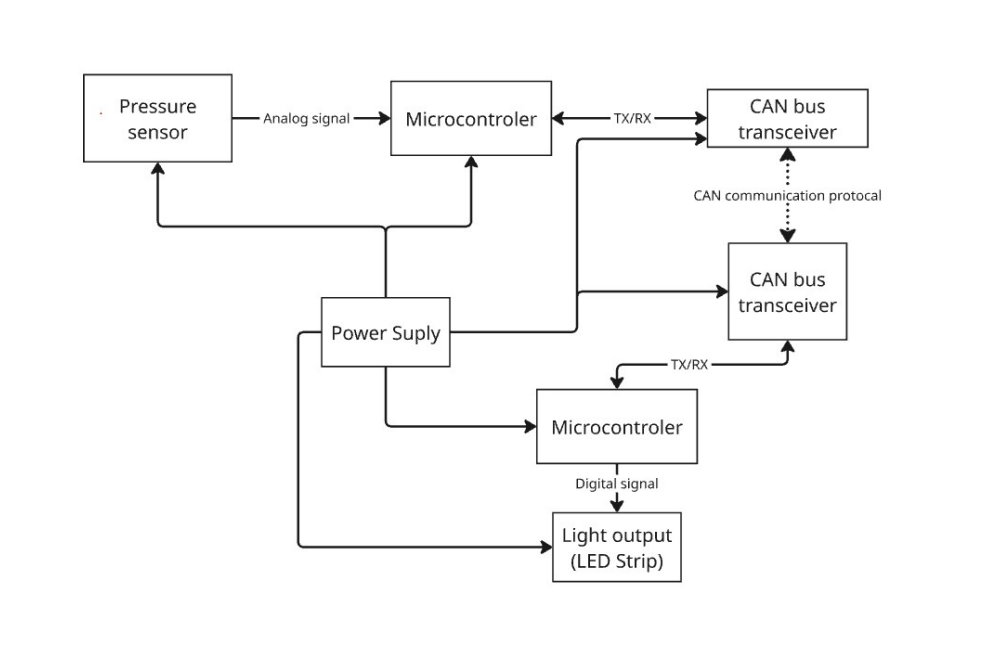
- Sensors: We use touch sensors integrated into the handrails. Unlike traditional buttons, these respond to the natural grip passengers use to stabilize themselves.
- LED Integration: RGB LED strips are installed along the connections of the handles and distributed across the ceiling panels. If necessary, a screen may also be mounted on the ceiling of the metro car to provide additional possibilities beyond the light strips, such as creating a changing environment with lighting adapted to the time of day. The placement and structure of the LEDs are clear and organized, allowing passengers to follow “their light” and trace the connection to other people.
Tables 2 and 3 presents a electricity consumption of our hardware. Usage of interrupt based architecture and deep sleep modes decreases power consumption of installation significantly when not used, which helps to keep the system sustainable.
| Equipment | Qty | Rail | U (V) | I per unit (A) | I total (A) | P (W) |
|---|---|---|---|---|---|---|
| ESP32-C3 sensor nodes | 10 | 5.0 V | 5 | 0.120 | 1.200 | 6.000 |
| ESP32-C3 central node | 1 | 5.0 V | 5 | 0.150 | 0.150 | 0.750 |
| CAN transceiver MCP2551 | 10 | 5.0 V | 5 | 0.010 | 0.100 | 0.500 |
| LED strips WS2812B (2 m, 120 LEDs each) | 3 | 12.0 V | 12 | 2.400 | 7.200 | 86.400 |
| Velostat pressure sensors | 15 | 3.3 V | 3.3 | 0.001 | 0.015 | 0.050 |
| Total | 93.700 | |||||
| Total + 25 % safety margin | 117.125 |
| Equipment | Qty | Rail | U (V) | I per unit (A) | I total (A) | P (W) |
|---|---|---|---|---|---|---|
| ESP32-C3 sensor nodes | 10 | 5.0 V | 5 | 0.300 | 3.000 | 15.000 |
| ESP32-C3 central node | 1 | 5.0 V | 5 | 0.300 | 0.300 | 1.500 |
| CAN transceiver MCP2551 | 10 | 5.0 V | 5 | 0.010 | 0.100 | 0.500 |
| LED strips WS2812B (2 m, 120 LEDs each) | 3 | 12 V | 12 | 7.200 | 21.600 | 259.200 |
| Velostat pressure sensors | 15 | 3.3 V | 3.3 | 0.001 | 0.015 | 0.050 |
| Total | 276.250 | |||||
| Total + 25 % safety margin | 345.313 |
The hardware implementation is realized through two dedicated PCB designs: the Sensor Node PCB and the Central Node PCB.
1. Sensor Node PCB
The Sensor Node PCB integrates all the components required for local sensing, processing, and communication. To convert physical pressure into data, the circuit utilizes a Velostat sensing interface in a voltage divider configuration. The detailed electrical connections are illustrated in the Sensor Node Schematic (Figure 11).
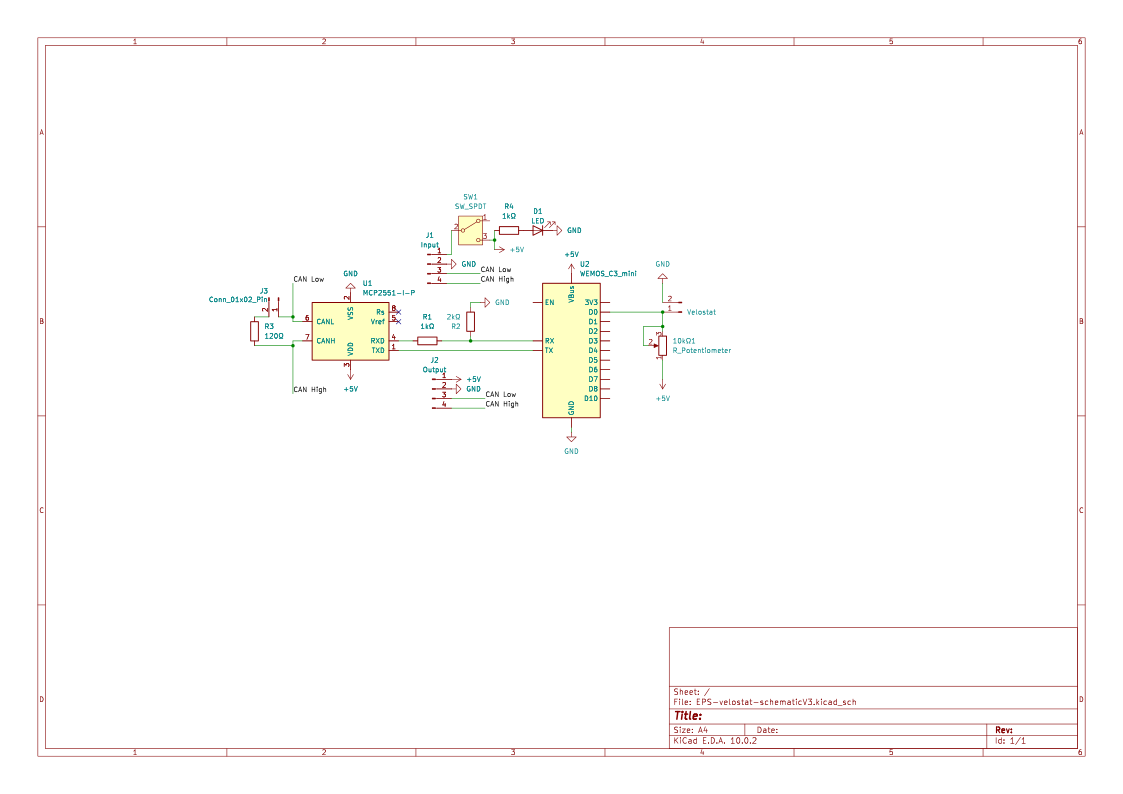
The node includes an ESP32-C3 Microcontroller (Wemos C3 Mini) and an MCP2551 CAN Transceiver. A 10kΩ potentiometer is included to allow manual calibration of the sensor's sensitivity range. To ensure network versatility, the PCB includes a selectable jumper for the 120 Ω termination resistor. This allows the same PCB design to be used at any position in the bus, enabling termination only on the physical end-nodes of the network to prevent signal reflections. As shown in Figure 12, the PCB is designed to be embedded directly into a box that would be attached to the handrail structure for minimal visual impact and high mechanical robustness.
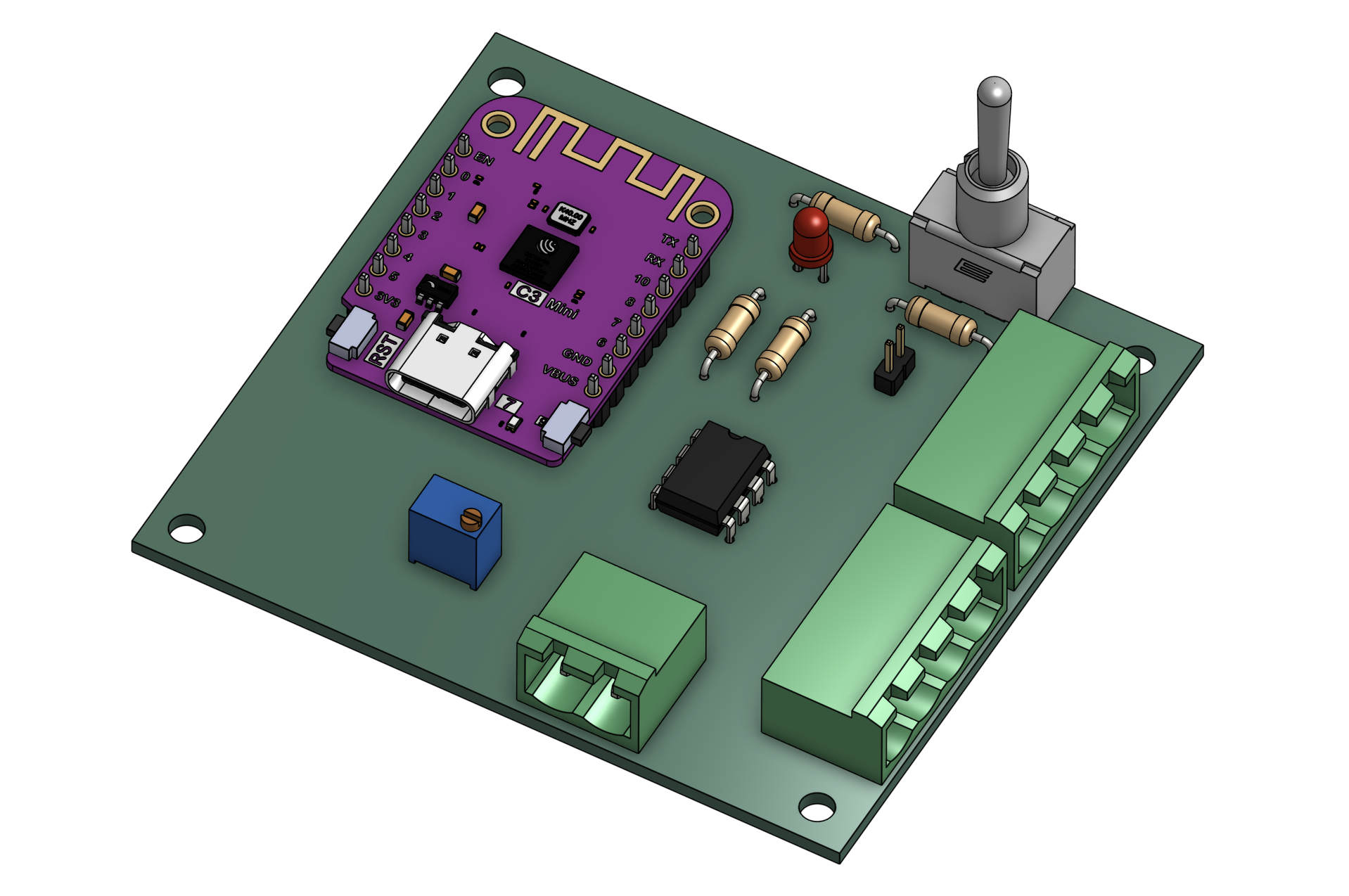
Each Sensor Node PCB operates as an autonomous unit within the distributed system, transmitting processed sensor data through the CAN bus network to the Central Node.
2. Central Node PCB
The Central Node PCB acts as the main coordination unit. It is responsible for aggregating data from all sensor nodes and generating the corresponding visual output. The integration of the processing unit with the lighting infrastructure is detailed in the Central Node Schematic (Figure 13).
As shown in Figure 14, this PCB consolidates communication and actuation. It features a dedicated WS2812B LED Control port with a 330Ω resistor (R1) in series to protect the data line and ensure signal integrity.
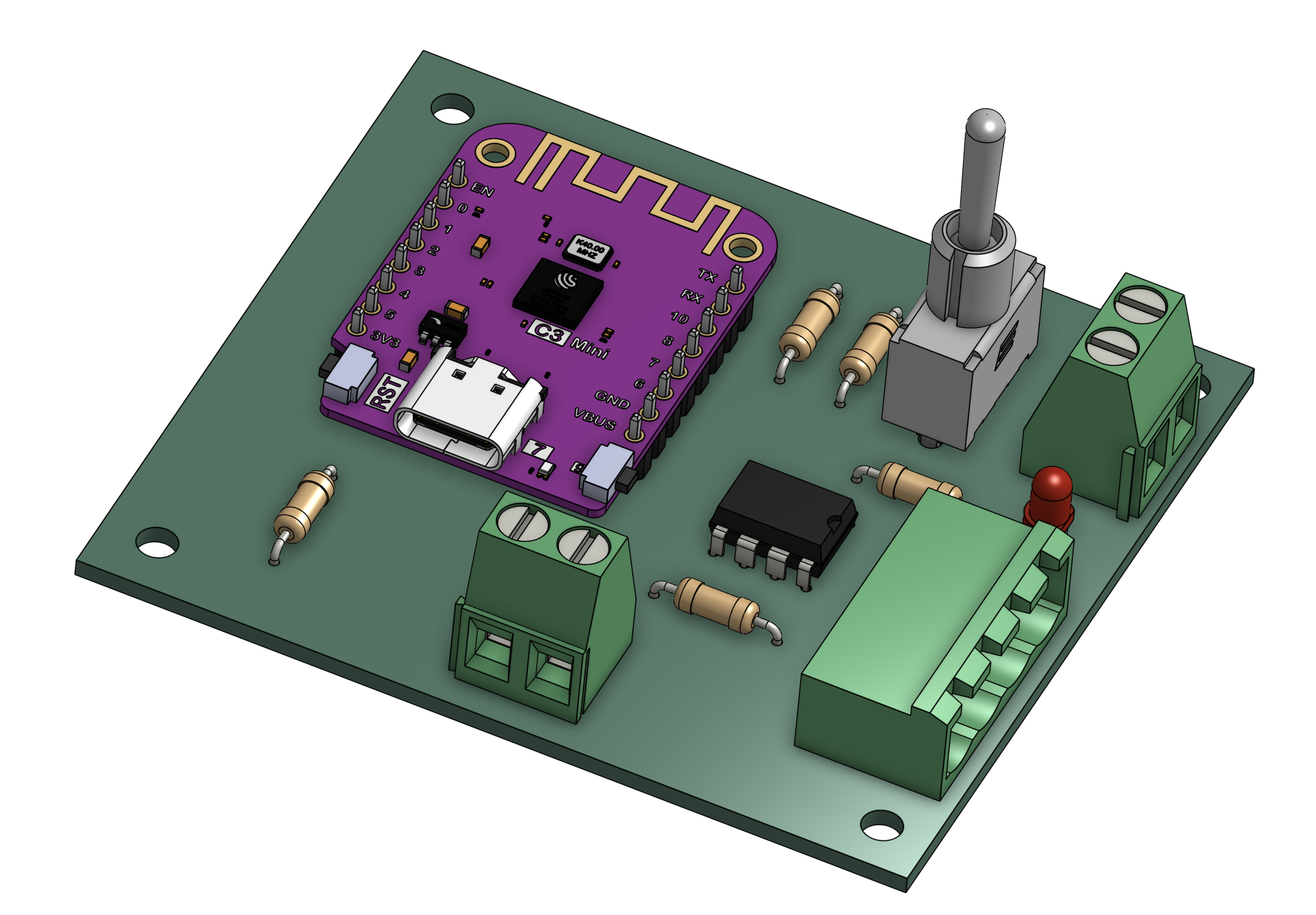
This board processes all incoming CAN messages and translates them into real-time visual feedback through the LED infrastructure, ensuring synchronization between multiple sensor inputs.
Technical Implementation Details
A critical aspect of the design is the voltage compatibility between the ESP32-C3 (3.3 V) and the MCP2551 (5V). While the transceiver requires 5V to meet CAN standards, the ESP32-C3 GPIOs are not 5V tolerant. To address this, both schematics implement a voltage divider on the RX line, using a 1kΩ resistor in series and a 2kΩ resistor to ground. This scales the signal from the MCP2551 down to approximately 3.3V, ensuring safe operation. The TX line is driven directly at 3.3V, which the MCP2551 identifies as a valid logic “high.”
To ensure reliable data transmission within the electromagnetically noisy environment of a metro car, the system employs:
- Differential Signaling: Utilizing CAN High and CAN Low lines for high immunity to interference.
- Bus Termination: High-speed CAN networks require a 120 Ω resistor at both ends of the main bus to match characteristic impedance. By including a jumper on the Sensor Node PCB, the system can be easily configured during installation. Only the nodes at the extreme ends of the metro car's wiring will have the jumper closed, while intermediate nodes remain unterminated to maintain signal quality.
Software
The software architecture of the Connect and Share project facilitates real-time interaction and asynchronous digital connection across two distinct modes of use.
I. Use Cases and User Stories
Real-time Ambient Interaction operates through the smart device installed in the carriage. When passengers grip the handrail, sensors detect resistance changes via Velostat and the ESP32 triggers a corresponding color trail on the ceiling LED matrix. When data streams from multiple users intersect, the software executes color-blending algorithms to merge the inputs into a shared visual response.
Asynchronous Connection is mediated through a web application. Passengers scan a QR code to access a web interface, where the application fetches audio files from a cloud database for playback. The same interface allows users to record microphone input, which is then compressed and uploaded to a central repository for others to access.
II. Selection of Development Platforms
Platform selection (see Table 4) was guided by two priorities: low-latency hardware control and cross-platform accessibility.
| Layer | Selection | Justification |
|---|---|---|
| Firmware | ESP32 (C++) | Superior task management and precise control over LED timing. |
| Web Interface | React | Immediate access via QR code without requiring app installation. |
| Backend | Supabase | Relational data management and real-time database subscriptions. |
| IoT Communication | CAN Bus | High noise immunity in metro environments via differential signaling. |
III. Component Diagram
Figure 15 depicts the frontend flow of the Connect web interface. Starting from a QR code scan, the browser fetches and renders the website. The user is then presented with two interaction options: writing a message, which is transmitted to the backend, or reading a message, which triggers a random message fetch and displays it on screen.
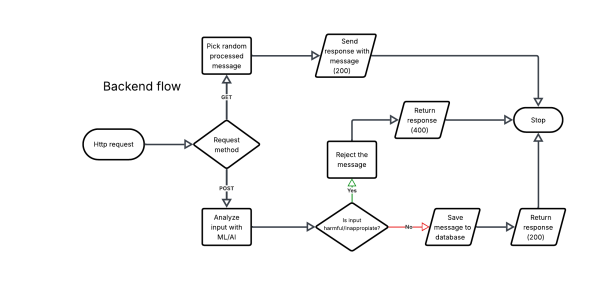
Figure 16 illustrates the backend flow. IIncoming Hypertext Transfer Protocol (HTTP) requests are routed based on method: GET requests retrieve a randomly selected stored message and return HTTP 200, while POST requests pass the submitted content through a Machine Learning (ML) / Artificial Intelligence (AI) moderation check. Content flagged as harmful is rejected with HTTP 400; clean content is saved to the database and confirmed with HTTP 200.
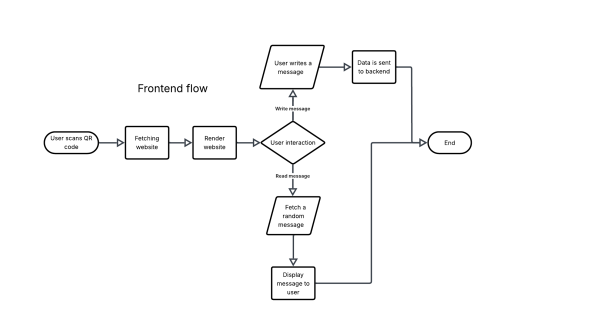
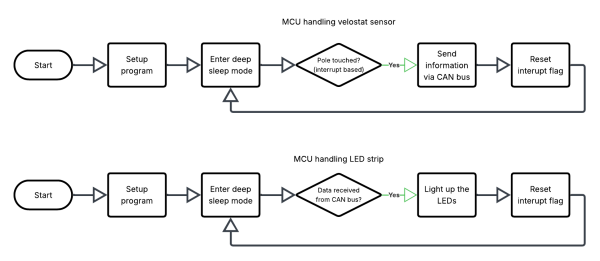
Figure 17 shows the firmware logic running on the two ESP32-C3 nodes. The upper flow covers the sensor node: it enters deep sleep after setup and wakes on a touch interrupt, transmits the event over CAN bus, then resets and loops. The lower flow covers the actuator node: it similarly sleeps until a CAN bus data frame is received, drives the LED strip, and resets. Both nodes share the same interrupt-driven sleep cycle structure.
7.4.3 Packaging
Choice of Materials and Design
High-quality Portuguese cork was deliberately chosen for the packaging. This material is locally available, fully sustainable and fits seamlessly with Porto's cultural identity.
- Protection: Cork possesses excellent, natural shock-absorbing properties to transport the hardware safely.
- Efficiency: To minimise material use, we make the boxes precisely to the dimensions of the hardware. By stacking them later, we retain the functionality of a piece of furniture without wasting unnecessary material.
1. The Optimised, Stackable Design
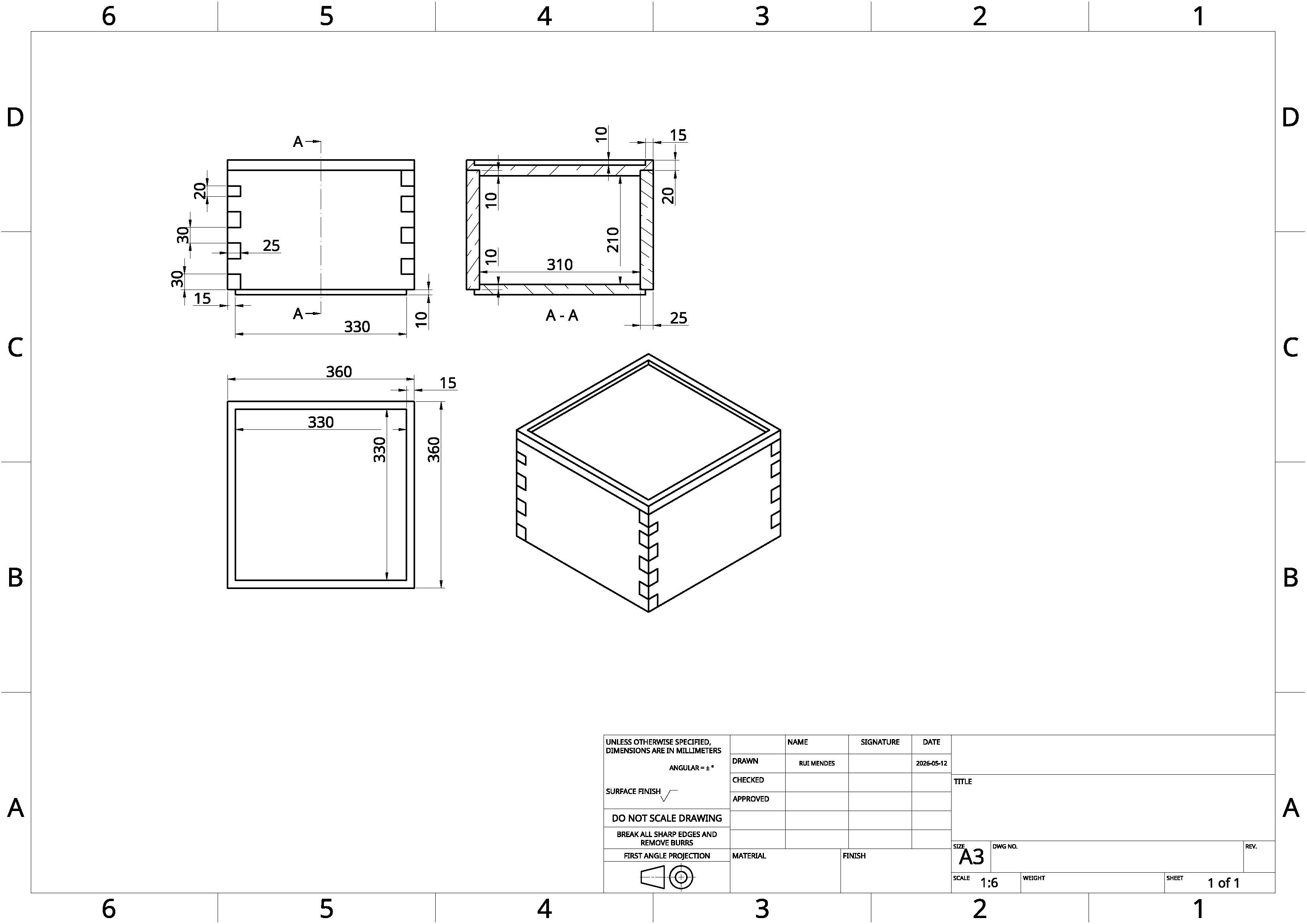
- External dimensions: 36 x 33 x 26 cm (L x W x H).
- Internal dimensions: Approx. 33 x 31 x 21 cm.
- Wall thickness: A wall thickness of 2.5 cm remains all round, with a 3 cm lid (1 cm of which fits inside the box) and a 2 cm base. This is efficient in terms of material usage, yet more than sufficient to guarantee structural integrity during transport.
The 'Lego' Connection System: As the piece of furniture consists of stacked boxes, we need to prevent them from slipping during use. We solve this with a clever modular system:
- The bottom of each box has a slight 1 cm protrusion (part of the 2 cm base).
- The lid has a notch of exactly 1 cm.
- This allows the boxes to click together like Lego bricks, locking firmly in place when stacked.
Tolerance-Based Closure: To secure the lid without any additional materials, we utilise precise manufacturing tolerances. Because cork is naturally slightly compressible, the 1 cm inner portion of the lid is designed to fit snugly inside the box. The material compresses slightly when pushed closed, holding the lid firmly in place via natural friction. This eliminates the need for tape, glue, or metal fasteners, ensuring the packaging remains 100 % monomaterial and truly sustainable.
Structural Reinforcement: The 'Cross-Support' System To ensure a seamless transition from transport packaging to durable public furniture, the internal structure is specifically reinforced. While cork is naturally robust, the intensive demands of a busy metro environment require additional load-bearing capacity for long-term use.
- The Reinforcement Cross: Each packaging unit includes two additional wooden planks. These planks feature a central notch, allowing them to be slotted together into a sturdy “cross” (X-shape) configuration.
- Sustainable Origin: These supports are crafted from reclaimed timber (waste wood), aligning with our circular philosophy by avoiding the use of new raw materials.
- Assembly and Function: Once the hardware is removed and the box is empty, the wooden cross is placed diagonally inside. When the lid is replaced, it rests directly on this internal frame. This transfers the vertical load of a person (sitting or leaning) directly to the base of the box.
- Load Integrity: This internal bracing ensures the units can easily support the weight of an adult, preventing any deformation or structural fatigue during its second life in the 'Social Hub'.
Figure 18 presents a structural drawings of our packaging.
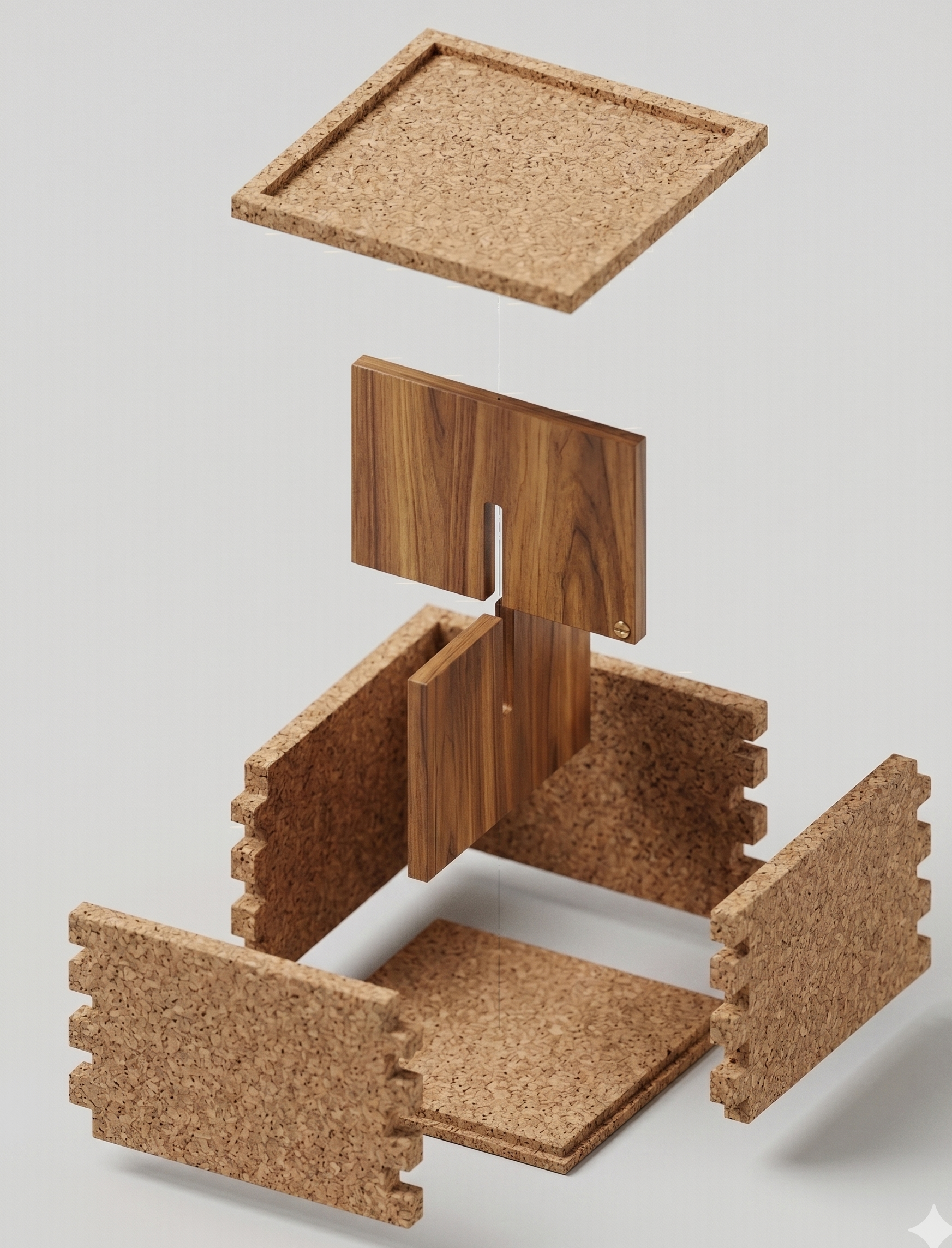
Figure 19 presents a 3D model of our packaging.
2. Secondary Function: The 'Social Hub'
The core idea behind this circular design is the complete elimination of waste. Once the technical installation in the metro is complete, the cork blocks are given a second life on the platforms or in the concourses (as at Trindade or São Bento stations). They are used as modular seating elements to encourage social interaction among passengers.
To create a functional and inviting 'Social Hub', approximately 10 to 12 packaging units are required. This allows us to immediately create 5 to 6 full-size seats and respond to the dynamics of the space:
- Ergonomic seating height: By stacking two boxes on top of each other, we achieve an exact seating height of 51 cm (26 cm + 25 cm, due to a 1 cm overlap). This is an ideal, ergonomic height for adults.
- Playful heights: A single box (26 cm) works perfectly as a footstool or child's seat. Three stacked boxes (76 cm) serve as a practical standing table or place to lean on.
- The Circle or L-shape: The blocks can be pushed together to form a large seating area. As travellers sit facing each other, this naturally encourages the sharing of experiences.
- Scattered Islands: In busier areas, the stools can be split into smaller, intimate arrangements of three or four seats.
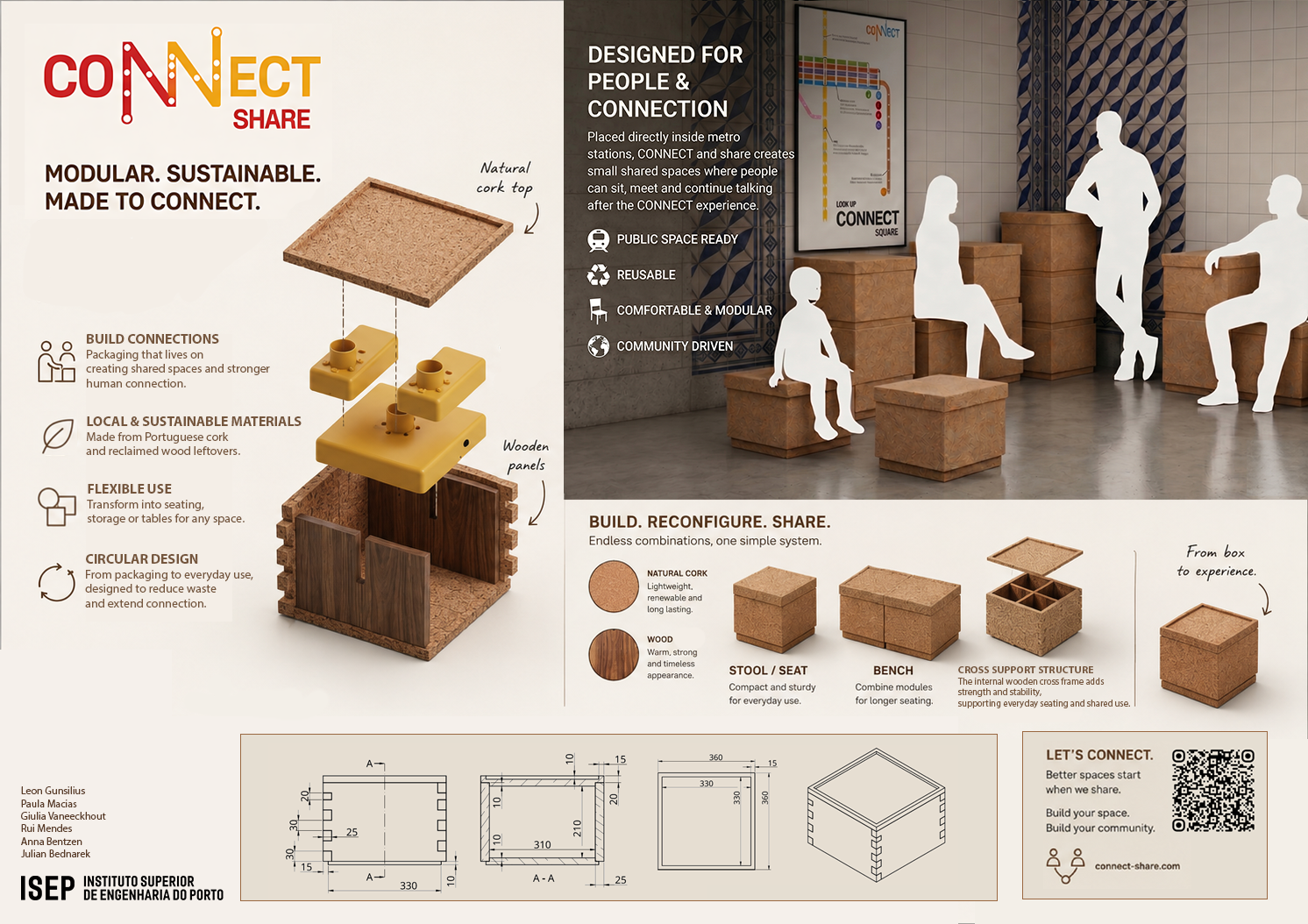
Figure 20 is a poster which present our packaging solution in detail.
7.5 Prototype
The prototype constitutes a deliberate functional reduction of the full designed solution. Rather than replicating the complete metro-carriage installation, it validates the core interaction loop — pressure sensing, CAN bus communication, and LED feedback — on a single handrail segment with two nodes. Total prototype cost is 97.92 €, within the 100 € budget constraint.
7.5.1 Structure
The designed solution specifies eleven ESP32-C3 nodes distributed across a full carriage, housed in PA Rail enclosures rated for EN 45545-2 fire compliance. This is reduced in the prototype to two nodes covering one handrail segment. The two-node configuration is sufficient to verify bidirectional CAN bus communication and the shared LED response behaviour without requiring the full network topology.
The PA Rail enclosures are replaced entirely. Sourcing a fire-rated enclosure from a non-Portuguese supplier (Nanovia, FR) was impractical within the budget at 69.30 € per unit. The prototype housing is instead 3D-printed in PLA using university facilities. PLA is biodegradable and structurally adequate for a lab context, but is not fire-rated and would not meet EN 45545-2 requirements in a deployed installation. The enclosure geometry follows the structural draft.
The sensor array is scaled proportionally. The designed solution uses fifteen Velostat sheets and fifteen copper tape rolls, one per handrail grip position. The prototype uses two Velostat sheets and a single copper tape roll, covering both nodes. The LED strip is reduced from three 2-metre addressable strips to one 1-metre WS2813 strip with a diffuser profile, sufficient to demonstrate the full colour-gradient feedback mechanic.
The dual power rail (12 V and 5 V) with six step-down converters is replaced by a single 5 V / 4 A bench supply, eliminating the 12 V distribution chain. This is compatible with the WS2813 strip, which is rated for 5 V operation, and with the ESP32-C3 and MCP2551 supply requirements.
The table below summarises the structural differences:
| Parameter | Designed Solution | Prototype |
|---|---|---|
| Nodes | 11 | 2 |
| Handrail segments | Full carriage | Single segment |
| Enclosure | PA Rail (EN 45545-2) | 3D-printed PLA |
| Velostat sensors | 15 | 2 |
| LED strip length | 3 × 2 m | 1 × 1 m |
| Power architecture | Dual rail (12 V + 5 V) | Single 5 V / 4 A supply |
| CAN transceivers | 10 | 2 |
| Total cost | 767.01 € | 97.92 € |
The following images show the design for the planned physical prototype.
7.5.2 Hardware
The core hardware architecture is unchanged: each node consists of an ESP32-C3 (XIAO form factor) with an MCP2551 CAN transceiver. The interrupt-driven sensing and CAN frame transmission firmware runs identically on both prototype nodes and would scale to the full eleven-node network without modification.
The following hardware changes apply to the prototype specifically:
LED strip: The designed solution references a 5 V addressable RGB strip sourced from Amazon (€30.49 per unit). The prototype uses the Seeed WS2813 1 m strip (11.27 €), which uses the same WS2813 protocol and is therefore firmware-compatible. A sliding opaque diffuser profile is added to soften the LED output, which was absent from the designed solution BOM.
Power supply: The ideal BOM includes dedicated Mean Well-class step-down converters for 12 V and 5 V rails, sized for worst-case current draw across all nodes. The prototype uses a single 5 V / 4 A wall adapter (11.75 €) connected via a barrel jack screw terminal adapter. This supply is adequate for two nodes and one LED strip but would not scale to the full installation.
Potentiometer: A 10 kΩ linear potentiometer (0.49 €) is added to the prototype to allow manual simulation of varying pressure on the sensor input during development and demonstration, independent of physical contact on the Velostat.
CAN bus wiring: The prototype makes explicit a 2 × 1.0 mm twisted-pair speaker cable (2.20 €) as the CAN bus physical medium. This is not listed as a separate line item in the ideal BOM, where structured cabling would be integrated into the enclosure installation.
The schematic below shows the complete prototype circuit for one node. Both nodes are electrically identical; the second node connects to the same CAN bus and 5 V power rail.
ADD PICS FOR PROTOTYPE
7.5.3 Software
The software architecture required no structural changes between the designed solution and the implemented prototype. This is a direct consequence of how the system scales: adding carriage nodes means flashing the same firmware onto additional ESP32-C3 units, not redesigning the communication layer. The CAN bus topology accommodates new nodes without configuration changes, and the interrupt-driven deep sleep cycle described in Figure 17 is stateless by design, making each node independently deployable.
The web interface scales with equal simplicity. The Next.js frontend is a static asset bundle served from Vercel's edge network; at larger passenger volumes, a CDN and a load balancer in front of the Supabase backend are sufficient to absorb additional read and write traffic. The load testing results in Table 8 support this: the send endpoint sustains 1000 concurrent requests with a mean latency of 195.77 ms and a zero error rate, well within acceptable bounds for a non-real-time messaging feature. The frontend itself is lightweight at approximately 3.6 kB per request, leaving significant headroom before network overhead becomes a concern.
The three-layer architecture, firmware, web interface, and backend, therefore carries over from design to prototype without modification. The detailed implementation was already detailed in previous sub section of this report.
7.6 Tests & Results
7.6.1 Hardware tests
Below we can find in Table 6 the complete log for the validation phase. Each requirement must be marked as Pass (P) or Fail (F) based on the methodologies described in Tests..
| ID | Category | Requirement / Description | Success Criteria | Status | Date |
|---|---|---|---|---|---|
| FT-01 | Functionality | Velostat Touch Detection | ADC values respond linearly to pressure | ||
| FT-02 | Functionality | CAN Bus Communication | Packet Delivery Ratio > 99.9 % | ||
| FT-03 | Functionality | LED Visual Response | Correct RGB colors and no flickering | ||
| FT-04 | Functionality | Sensitivity Calibration | Potentiometer adjusts trigger threshold | ||
| FT-05 | Functionality | Power Management | Stable 5.0 V output at 72 V/110 V input | ||
| PT-01 | Performance | System Response Time | Total latency from touch to light < 100 ms | ||
| PT-02 | Performance | EMI Noise Resistance | No “ghost triggers” near DC motors | ||
| PT-03 | Performance | Thermal Performance | Enclosure surface temp < 50 °C after 4 h | ||
| PT-04 | Performance | Voltage Drop | End-of-line voltage > 4.7 V | ||
| PT-05 | Performance | Long-term Durability | System stable after 1000 trigger cycles | ||
| ST-01 | Software | Integration Simulation | Zero mechanical interference in CAD model | ||
| ST-02 | Software | CAN Logic Simulation | Correct ID priority during collisions | ||
| ST-03 | Software | Animation Algorithm | Smooth transitions and no memory leaks | ||
| ST-04 | Software | Fault Detection | LEDs switch to White on CAN failure | ||
| SF-01 | Safety | Electrical Safety | Enclosure-to-GND resistance < 0.1 Ω | ||
| SF-02 | Safety | Mechanical Safety | No sharp edges/protruding screws (Tactile) | ||
| SF-03 | Safety | Fire Safety | Cables/Plastic certified V-0 or LSHF | ||
| SF-04 | Safety | Vandalism Resistance | Sensor functional after 5 kg impact test | ||
| SF-05 | Safety | Ingress Protection (IP) | No moisture inside after cleaning mist test | ||
| UA-01 | UAT | Trigger Intuitiveness | User finds sensor without instructions | ||
| UA-02 | UAT | Visual Comfort | No reports of glare or eye strain | ||
| UA-03 | UAT | Feedback Clarity | User understands animation meaning | ||
| UA-04 | UAT | Ergonomic Accessibility | Successful trigger by users of varying heights |
7.6.2 Software tests
Performance
Table 7 shows the two main API endpoints. The read endpoint transfers 3.65 kB with a 165 ms round-trip, while the send endpoint transfers a comparable 3.61 kB but takes over twice as long at 367 ms, indicating server-side processing overhead on write operations.
| Request | Size (kB) | Latency (ms) | URL |
|---|---|---|---|
| Read | 3.65 | 165 | https://metro-voices.vercel.app/read |
| Send | 3.61 | 367 | https://metro-voices.vercel.app/send |
Table 8 presents load testing results for the send endpoint across 1 to 1000 concurrent requests. At a single request the baseline latency is 367 ms. Throughput improves significantly under light concurrency: 10 parallel requests drop the mean to 81.5 ms, likely due to connection reuse and reduced cold-start overhead. Latency climbs gradually under heavier load, reaching 195.77 ms at 1000 requests, with standard deviation growing from 53.62 ms to 102.69 ms, reflecting increased queuing variance. The zero error rate across all load levels confirms the backend scales reliably within this range.
| Number of requests | Error rate (%) | μ ± σ (ms) |
|---|---|---|
| 1 | 0 | 367 ± 0 |
| 10 | 0 | 81.5 ± 53.62 |
| 100 | 0 | 124.97 ± 87.26 |
| 1000 | 0 | 195.77 ± 102.69 |
User experience
Table 9 summarizes the overall SUS scores across all 11 participants. The mean score of 86.59 places the system in the “Excellent” range on the SUS adjective scale, well above the industry average of 68. The standard deviation of 14.93 is inflated by a single outlier scoring 42.5; the remaining ten participants scored between 82.5 and 100, indicating a near-unanimous positive reception.
| Metric | Value |
|---|---|
| Mean SUS score | 86.59 |
| Standard deviation | 14.93 |
| Min / Max | 42.5 / 100.0 |
| Responses above 68 | 10 / 11 |
Table 10 breaks down responses by individual SUS item. Positive items scored consistently high, with Q9 (“I felt very confident using the system”) achieving the highest mean at 4.73 and the lowest standard deviation at 0.47, suggesting near-unanimous agreement. Q5 (“functions well integrated”) and Q7 (“most people would learn quickly”) both scored 4.64, reflecting strong perceived learnability and coherence. Among negative items, Q2 (“unnecessarily complex”), Q4 (“need technical support”), and Q10 (“needed to learn a lot”) all averaged 1.45, confirming the system was perceived as approachable without prior training. Q8 (“cumbersome”) was the weakest negative item at 2.09, and Q6 (“too much inconsistency”) showed the highest variance overall at σ = 1.40, both attributable to the outlier respondent.
| Question | Item | Polarity | μ | σ |
|---|---|---|---|---|
| Q1 | I think that I would like to use this system frequently | Positive | 4.36 | 0.92 |
| Q2 | I found the system unnecessarily complex | Negative | 1.45 | 0.52 |
| Q3 | I thought the system was easy to use | Positive | 4.55 | 0.52 |
| Q4 | I think that I would need the support of a technical person | Negative | 1.45 | 1.21 |
| Q5 | I found the various functions well integrated | Positive | 4.64 | 0.50 |
| Q6 | I thought there was too much inconsistency | Negative | 1.82 | 1.40 |
| Q7 | Most people would learn to use this system very quickly | Positive | 4.64 | 0.50 |
| Q8 | I found the system very cumbersome to use | Negative | 2.09 | 1.14 |
| Q9 | I felt very confident using the system | Positive | 4.73 | 0.47 |
| Q10 | I needed to learn a lot of things before I could get going | Negative | 1.45 | 1.21 |
Unit testing
The API route handler for /api/messages was tested using Jest. The test suite covers both the GET and POST endpoints, with five test cases: returning a random message when data exists, returning null when no messages are stored, returning HTTP 500 on a Supabase error, returning the AI filter response on a successful POST, and returning HTTP 500 when the fetch call throws an error. All five tests passed in 0.277 seconds, as shown in Figure 33, which confirms that the route logic handles both normal use and error conditions as expected.

7.7 Summary
This chapter documents the comprehensive lifecycle of the Connect project, tracing its evolution from initial conceptualization to a fully realized and validated prototype. The development process was driven by the goal of transforming a standard metro carriage into a collaborative, interactive canvas designed to counteract digital isolation.
The phase began with Ideation and Design, where the core problem of digital passivity was translated into a two-phase interactive solution: real-time ambient light tracking and asynchronous voice messaging. This conceptual foundation was supported by a Smart System architecture, integrating touch-sensitive hardware with custom color-blending algorithms.
To move from theory to reality, the Structure stage utilized detailed 3D modeling and analysis to ensure physical viability. Iterative adjustments were made to hardware schematics and software flowcharts to optimize performance.
Having detailed the technical execution and rigorous testing of the system, the following section synthesizes these results to provide final reflections on the project's impact and future potential.